
Google Discover Traffic Growth: Why One Rank Math Setting Matters
- Google Discover favors large image previews
- Small thumbnails reduce click-through rate
- Rank Math controls the required meta directive
This article shows why the setting matters and how to enable it correctly.
1. Introduction
Google Discover shows content based on user interest, not search queries.
For publishers, this means:
- No keyword targeting
- No ranking positions
- Strong focus on visuals
Image size plays a direct role in whether a card stands out or gets ignored.
If your article shows a small thumbnail instead of a wide image, your click rate drops. We see this often, even on strong sites.
2. Why Image Preview Size Changes Results
Discover is a feed. Users scroll fast.
Large images take more space and draw attention. Small images do not.
Google allows publishers to control this using a robots meta directive:
<meta name="robots" content="max-image-preview:large">
If this tag is missing or restricted, Google may only show a small image.
Real case example
Tom Critchlow shared a case from a large publisher.
- About 200,000 Discover clicks per month
- Articles appeared with small image previews
- No technical errors
After enabling max-image-preview:large, Discover traffic increased by roughly 400 percent month over month.
The content did not change. Only the preview size did.
3. Google Data Confirms This
Google has published its own data on large image previews.
In one study:
| Publisher | Result |
|---|---|
| Kirbie’s Cravings | 79% increase in CTR |
| Istoé | 30% CTR increase and 332% more clicks |
These are not edge cases. We see similar patterns in client data.
4. How Rank Math Controls Image Preview Size
WordPress adds max-image-preview:large by default since version 5.7.
But SEO plugins can override this.
In Rank Math, the setting lives under global robots rules.
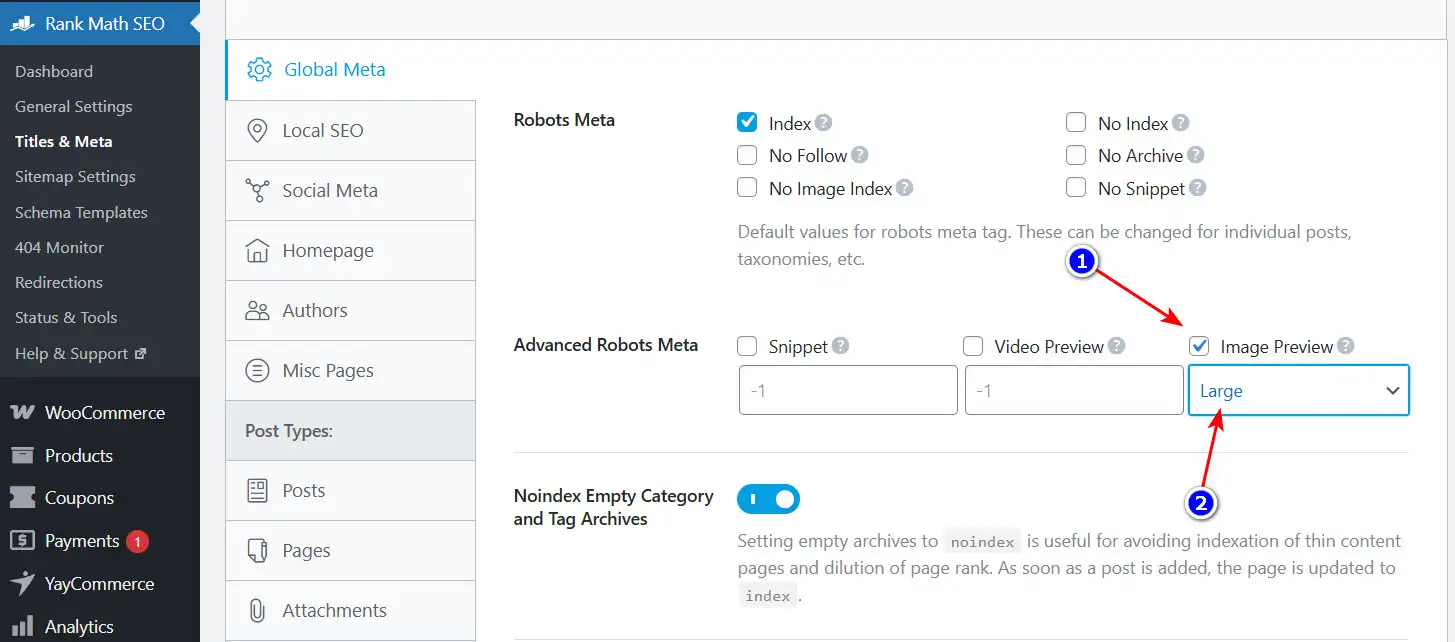
Rank Math setting for Image Preview set to Large under Advanced Robots Meta.
Steps
- Go to Rank Math SEO → Titles & Meta
- Open Global Meta
- Scroll to Advanced Robots Meta
- Enable Image Preview
- Select Large
- Save changes
This applies the directive site-wide.
Google can now use large images in Discover and other surfaces.
5. Image Requirements Still Matter
The meta tag alone is not enough.
Google has a hard rule:
- Images must be at least 1200px wide
If the image is smaller, Google will ignore the directive.
Other points:
- Use one clear featured image
- Avoid logos as featured images
- Keep images relevant to the topic
If Discover traffic matters to you, image prep is not optional.
6. What We Check in Client Audits
When Discover underperforms, we review:
- Robots meta output in the page source
- Rank Math global settings
- Featured image size and aspect ratio
- Consistency across post types
In many cases, fixing this setting is enough to change results.
7. Conclusion
Google Discover is visual first.
If your site sends the wrong signal, your content loses space in the feed.
The max-image-preview:large directive is low effort and high impact.
If you rely on Discover traffic and this is not set correctly, you are leaving clicks on the table.
References
- Critchlow, T. (2026). LinkedIn post on Discover traffic growth.
- Google Search Central. Large images case study.
- Make WordPress Core. Robots API and image preview directive.
- Google Search Central. Get on Discover.